Total Pageviews

Showing posts with label Whatsapp. Show all posts

Friday, 11 September 2015

Whats app Security Bleach - 200 million user at Risk

Security Flaw found in WhatsApp: 200 million users are at Risk


Security Flaw found in WhatsApp

You will be shocked to know that about 200 million users of the world’s most famous instant messaging service are at risk. Yes, about 200 million what’s app users are at security risk.
Few days back WhatsApp claimed to have hit over 900 million monthly active users! The web extension of what’s app puts many users at risk, the web version of WhatsApp is vulnerable to an exploit that could allow the hackers to convince the users to install the malware in their system in a new classy way.
WhatsApp launched its web version for iPhone users last month. WhatsApp web is current method to practice the mobile app in browser. It allows you to view all of your conversations, to see images, videos, audios you share with your friends and save them directly at your desktop.
A Security Flaw found in WhatsApp was discovered by security researcher Kasif Dekel in the web version of WhatsApp which allows hackers to share your machine by some malwares. Some of them are RATs (Remote Access Tools) which gives the hackers a remote access to your PC. The web version is also effected by Ransomware ( forces victim to pay a ransom through certain online payment methods in order to grant access to their system), bots and other malicious software.


 Security Flaw found in WhatsApp: How the Hack Works?

To exploit the vulnerability attacker needs to send a seemingly innocent vcard having the malicious code to the user. It is very easy to send .BAT file as legit vCard. This vCard looks like any other message but the WhatsApp user is unknown about the risk that it will trigger the malicious code when clicked.
After sending the vCard all an attacker need to do is wait the victim to open the message. As soon as the message is opened the executable malicious code in the vCard will run.

Security Flaw found in WhatsApp: What this Malicious Code can do

There are possibilities that the code after running will take the complete control over the target machine. But it will definitely monitor the user’s activities and use the target machine to spread virus.
The security team of WhatsApp has recognized the flaw and rolled out an update to fix the issue. So, you are advised to use the updated version of WhatsApp because every version before v0.1.4481. is vulnerable to the exploit.
Have something to add on Security Flaw found in WhatsApp ? Please add in comments.

Sunday, 6 September 2015

Hack WhatsApp Account

By Parth Makadiya


On Daily we have heard news about online services is suffering from a lack of security. In February WhatsApp has been down for nearly four hours,
as if this were not enough, people became aware of the security flaw that allows conversations that should be read by anyone provided it learn properly perform the procedures.

Steps to follow:
1 - First of all you need to have the device at hand, use the Social Engineering and be quick in getting the e-mail and backup files msgstore-2014-05-02.1.db.crypt5.
To get the email for this follow the procedures below.


Enter the Play Store and view the e-mail, or write down mentalize somewhere without the person noticing.


Now Go to the device settings from Settings -> Accounts & Sync, look for the email from Google and mentalize or write down somewhere without the person noticing.


2 - Now let's take the msgstore-2014-05-08.1.db.crypt7 file To do this, use Polaris Office or any other app that allows you to navigate between folders and manage files.

Follow this path: My files -> WhatsApp -> Databases - In this directory you will find all the backup files of your messenger.
When you do find the file sharing for your mobile phone via bluetooth.


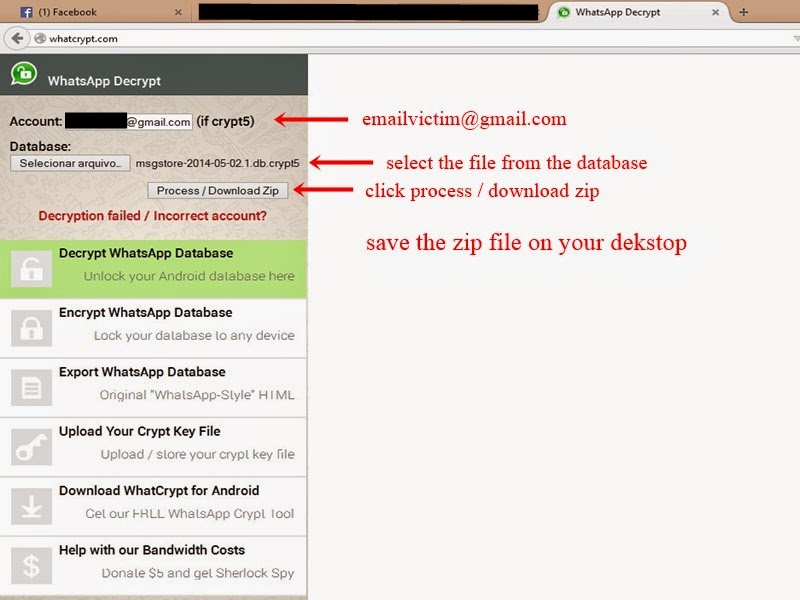
3 - Have we got the e-mail and file backup http://whatcrypt.com/?cmd=_decrypt
we enter the site and send the backup file.

To Submit follows:
Account: Enter the email of the victim
Database: Select the database backup
Click Process / download zip
Save the zip file on your desktop


4 - Once you have downloaded the backup file in zip format we now need to download the tool to extract the backup and we have access to conversations. Save on the desktop.


5 - From the desktop to extract the file WhatsApp Decrypt.zip install python-3.4.0 folder and enter the WhatsApp.
Browse by: WhatsApp -> Whatsapp_Xtract_V2.1_2012-05-10-2


When you install python-3.4.0 do the following steps:

1 - Go to My Computer, click with the right mouse button and Properties -> Advanced System Settings

2 - In the System Properties navigate to the Advanced tab -> Environment Variables

3 - Environment Variables look for Path

4 - Edit the PATH

5 - At the end of PATH add ;C:\Python34
6 - Click ok and close
  

6 - Now extract the file from step 3 msgstore_decrypted on the desktop, copy and paste it on WhatsApp folder -> Whatsapp_Xtract_V2.1_2012-05-10-2 and replace the file


7 - Replace the WhatsApp folder -> Whatsapp_Xtract_V2.1_2012-05-10-2 from step 5 and
look for msgstore.dll file, drag it onto the whatsapp_xtract_drag'n'drop_database file (s) _here


After you drag it will create a file called msgstore.db.html the folder and ask you to press any key at the command prompt to continue ...
Pressing any key it will open in your default browser displaying the file msgstore.db.html all conversations, dates, numbers, etc...

  
Note: In step 2 print shows the crypt 7 but the crypt is correct 5!